Get creative with our first ever Screenshot Competition! Enter Now

November Quality of Life #1 and #2 Patches
Better screenshots, page redesigns and more
3 hours ago
10th Nov, 2026 12:34
Avatar of ZeRo
Posted by ZeRo
3 minutes read
AI Summary
  • November’s QoL updates add several improvements across Lambda. Steam Group rewards return with 50,000 LC, 100 XP, and a selectable covert weapon finish. Documentation has been redesigned with better navigation, article ratings, and updated Lambda Networks content. User Guides are now public in supported docs spaces. Lambda Game Utilities 2.0 launches with a new UI, bug fixes, better game mounting, and lower RAM use. A new experimental home page improves feature discovery. Server and map detail pages were also upgraded with richer info, timer records, and player-submitted map ratings.
Introduction

This news post covers some of the new features and improvements from both #1 and #2 of November Quality of Life updates.

πŸ‘¨β€πŸ‘©β€πŸ‘§β€πŸ‘¦ Join our Steam Group! (QoL Patch #2)

The second quality of life update brings back Steam rewards. You now get 50,000 LC as a bonus, 100 XP and a covert weapon finish of your choice from a curated set of weapon finishes.
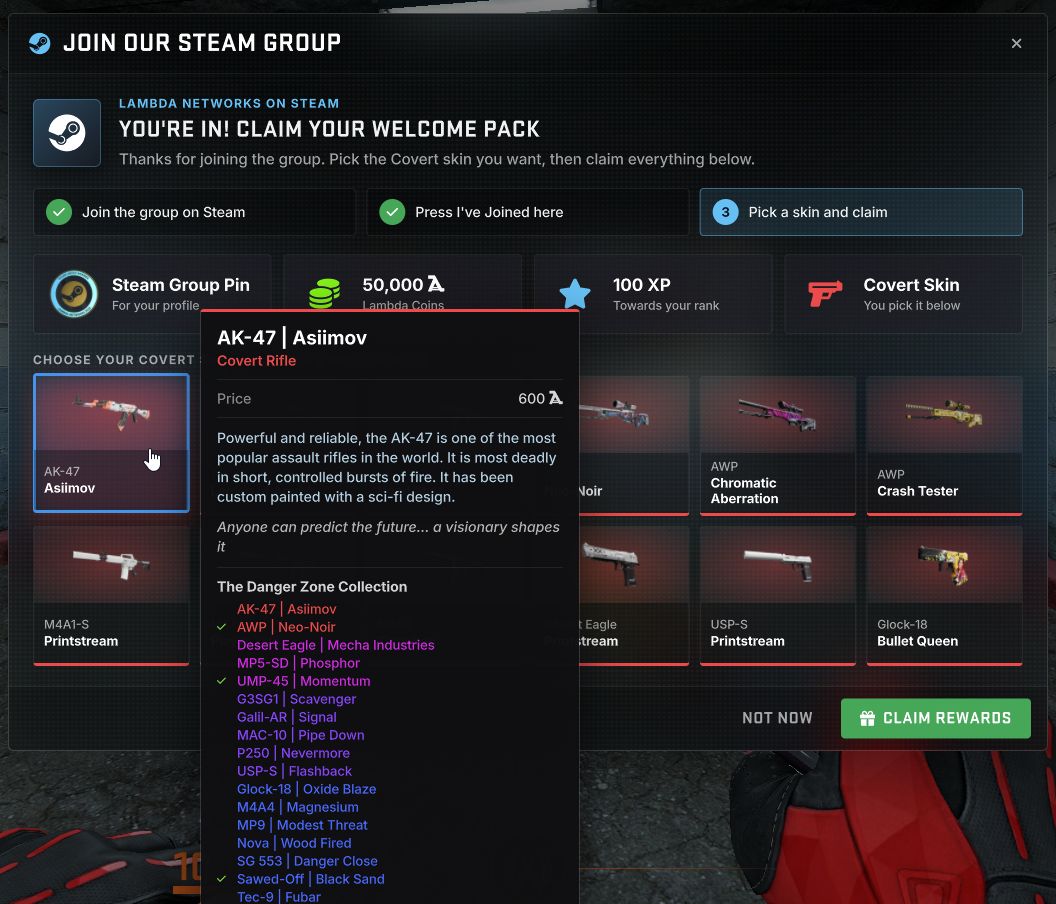
If you received rewards under the old system, do not worry, the reward cache has been cleared, so you can claim these new rewards.

Join our Steam Group Today

πŸ“š Docs Overhaul (QoL Patch #2)

I know this is like the 3rd of 4th time I've done this, however as more documentation is being added, the old design wasn't really working anymore.
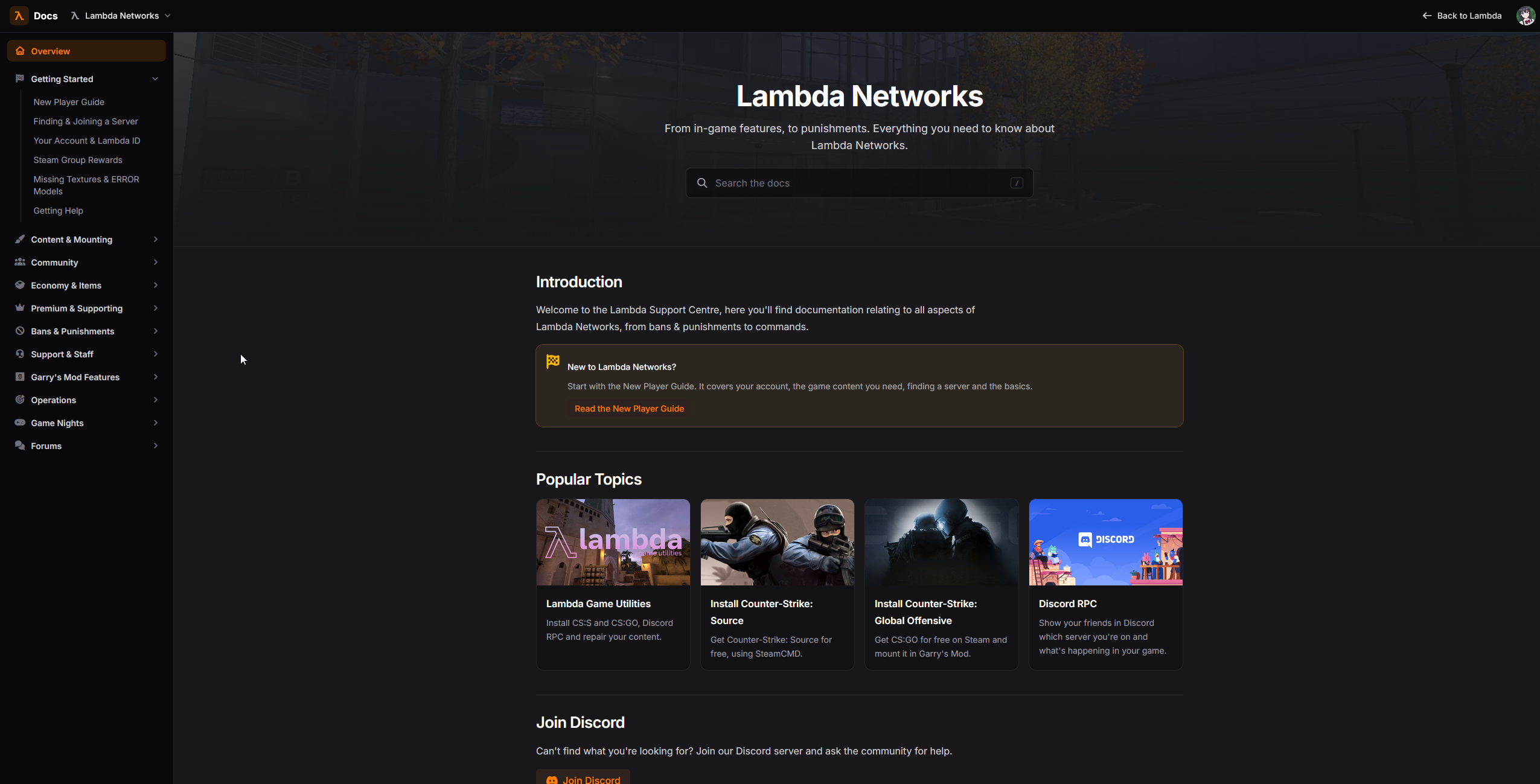
The new system now looks more like a traditional docs space you'd see in other websites, focusing more on content than eye candy.

In addition, you can now quickly switch between documentation spaces at the top, plus you can help us improve the quality of information by rating articles
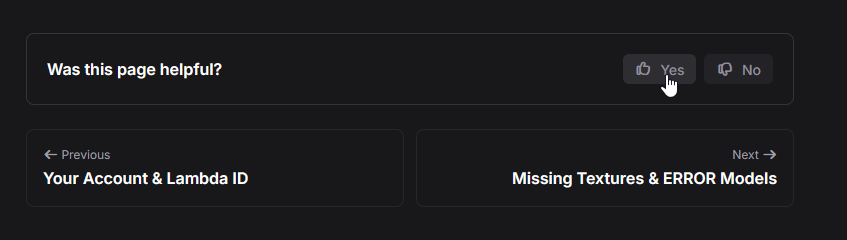
You can also now more easily navigate to the next and previous articles.

We've also updated the articles on the Lambda Networks space, bringing more up to date information and providing new and useful information for newer players.

πŸ“ƒ User Guides: Now publicly available (QoL Patch #2)

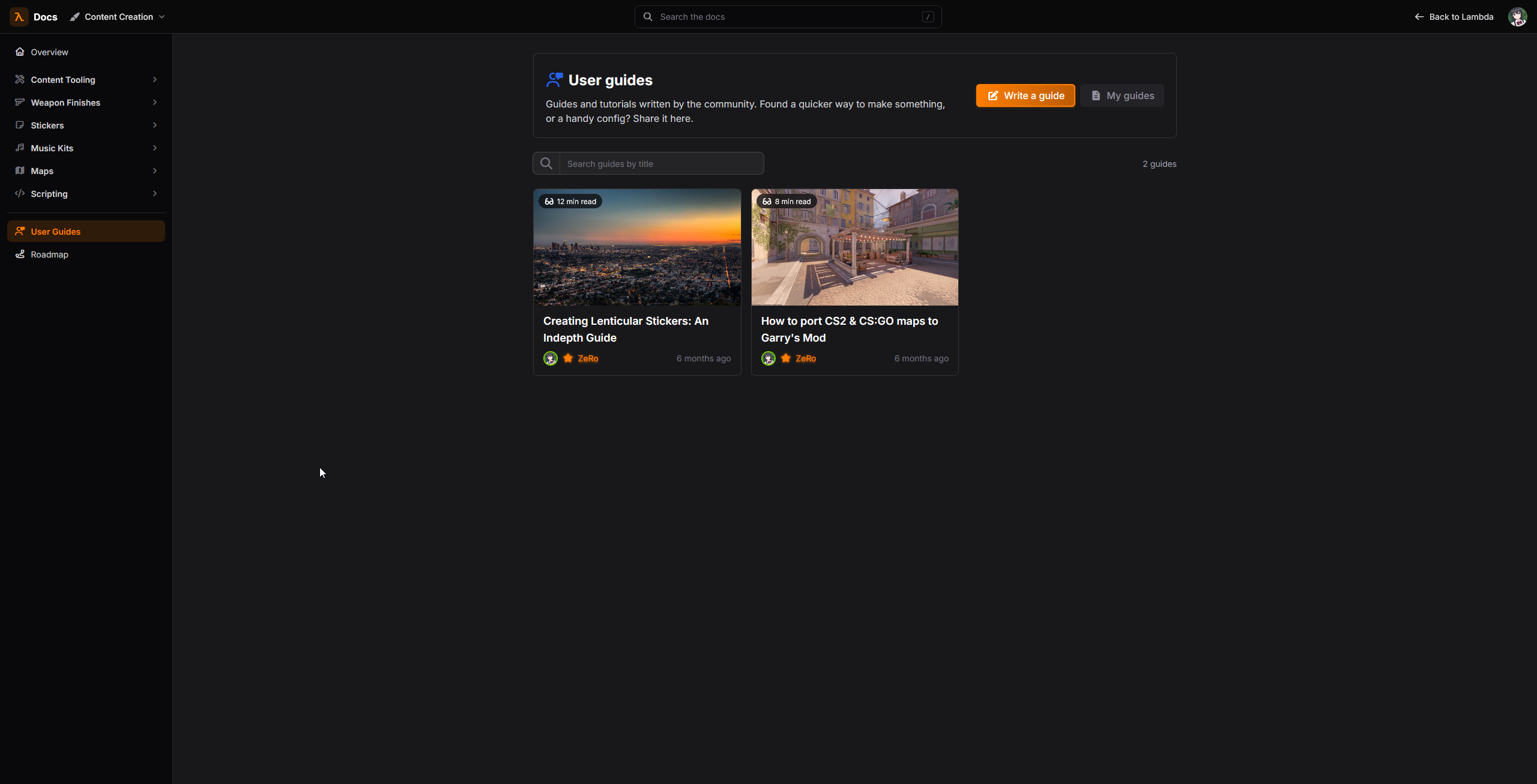
User Guides which were previously behind a Lambda Labs experiment, are now publicly available on documentation spaces that support them (Currently just Content Creation)
πŸ› οΈ Reintroducing Lambda Game Utilities (QoL Patch #2)

I'm pleased to announce Lambda Game Utilities v2.0.0
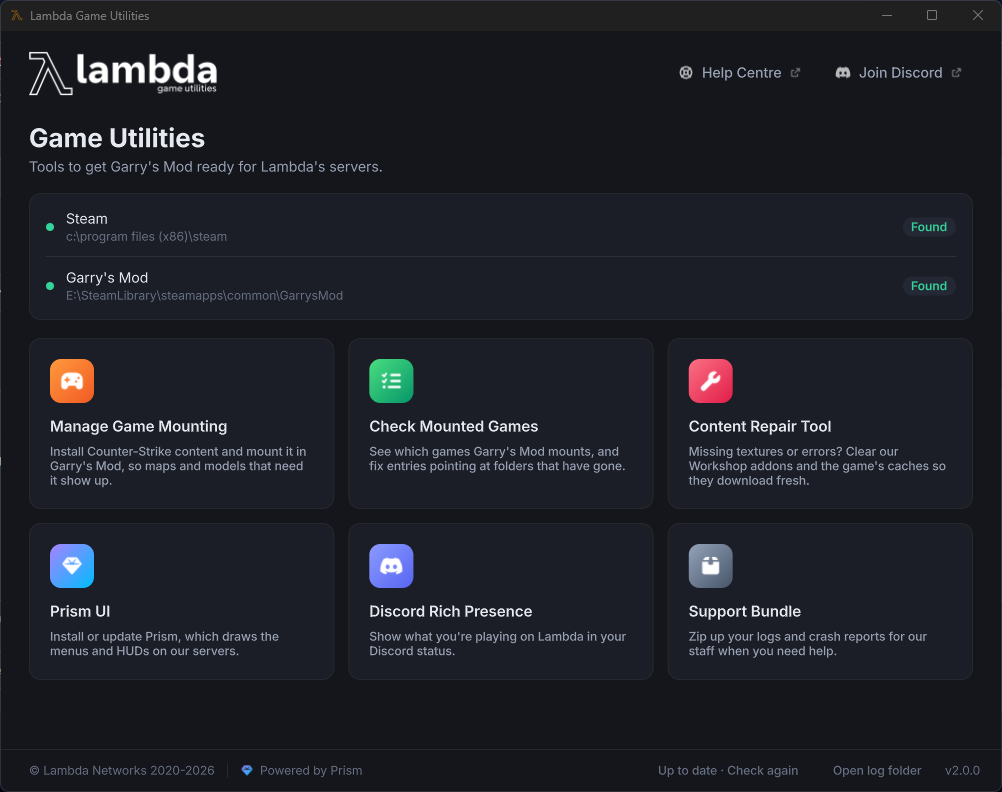
Built on Prism UI Desktop, the new tool brings a new UI overhaul, bug fixes and better game mounting. You can also use Game Utilities to keep Prism UI for Garry's Mod Updated.

Due to this version not using any kind of browser, the RAM footprint is light, running on average at ~176mb (Your milage may vary)

Download Lambda Game Utilities

🏠 New Lambda Labs Experiment: New Home Page (QoL Patch #2)

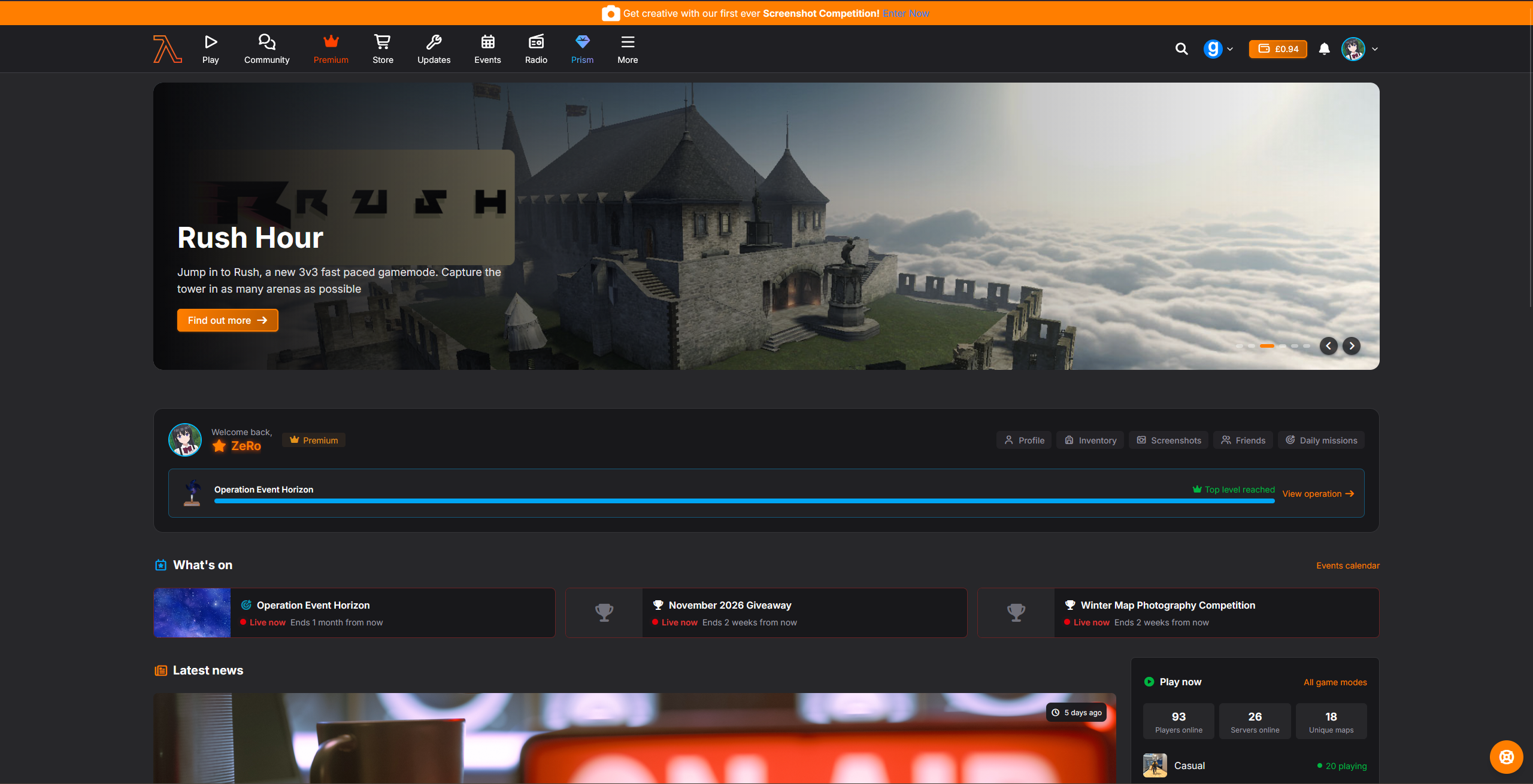
I've designed a new home page to make discovery across some of the new features more easier.

The new page includes servers, release notes, forum posts and latest workshop submissions.

Please let us know what you think.
πŸ’» Improved Server Detail Pages (QoL Patch #1)

Server pages have been given some love, updating the page to include more detail, while also cleaning up the design.
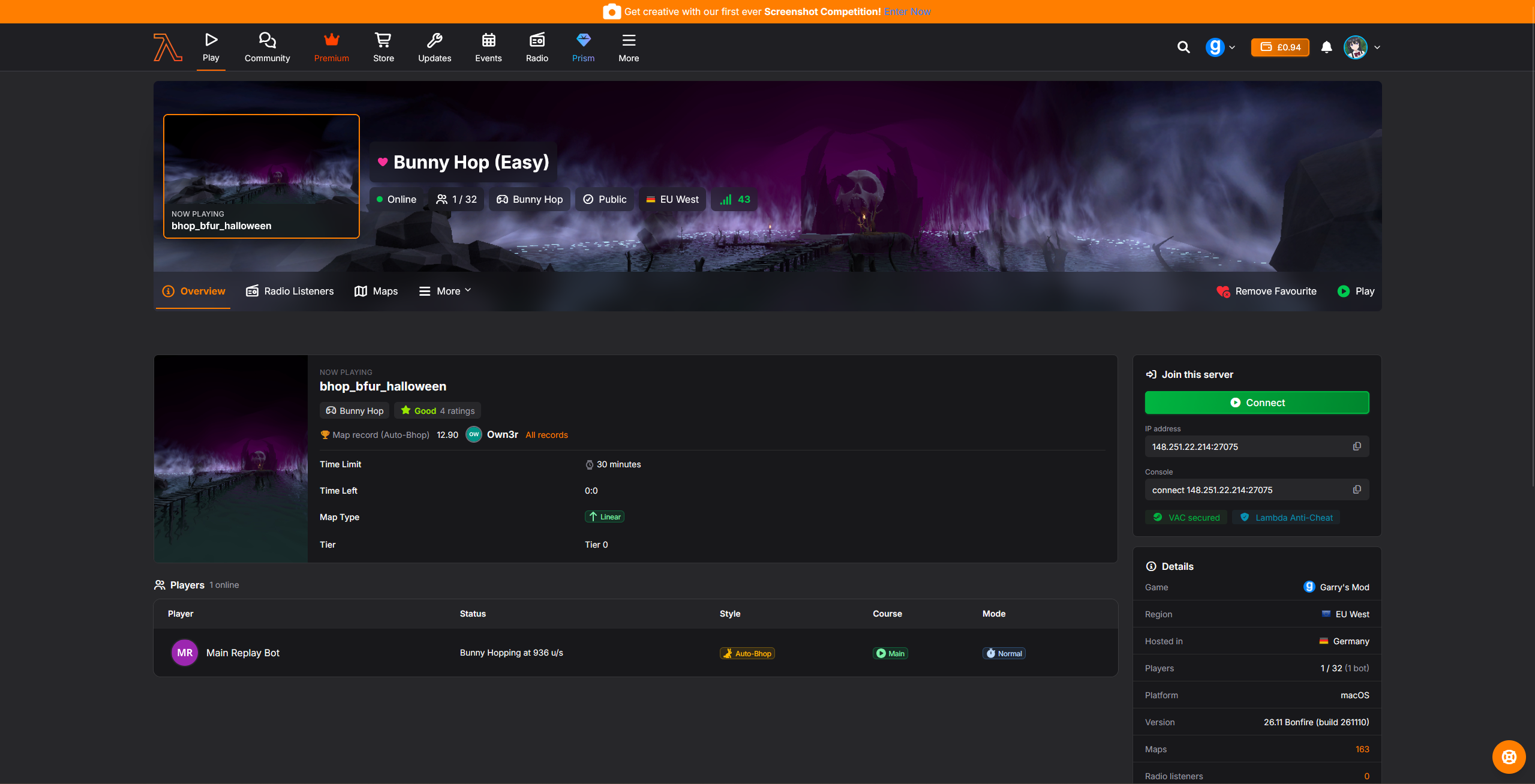
You can also see rich information about the server, depending on what each gamemode has exposed, plus for timer-based maps, you can see who holds the record on that map.

πŸ—ΊοΈ Improved Map Detail Pages (QoL Patch #1)

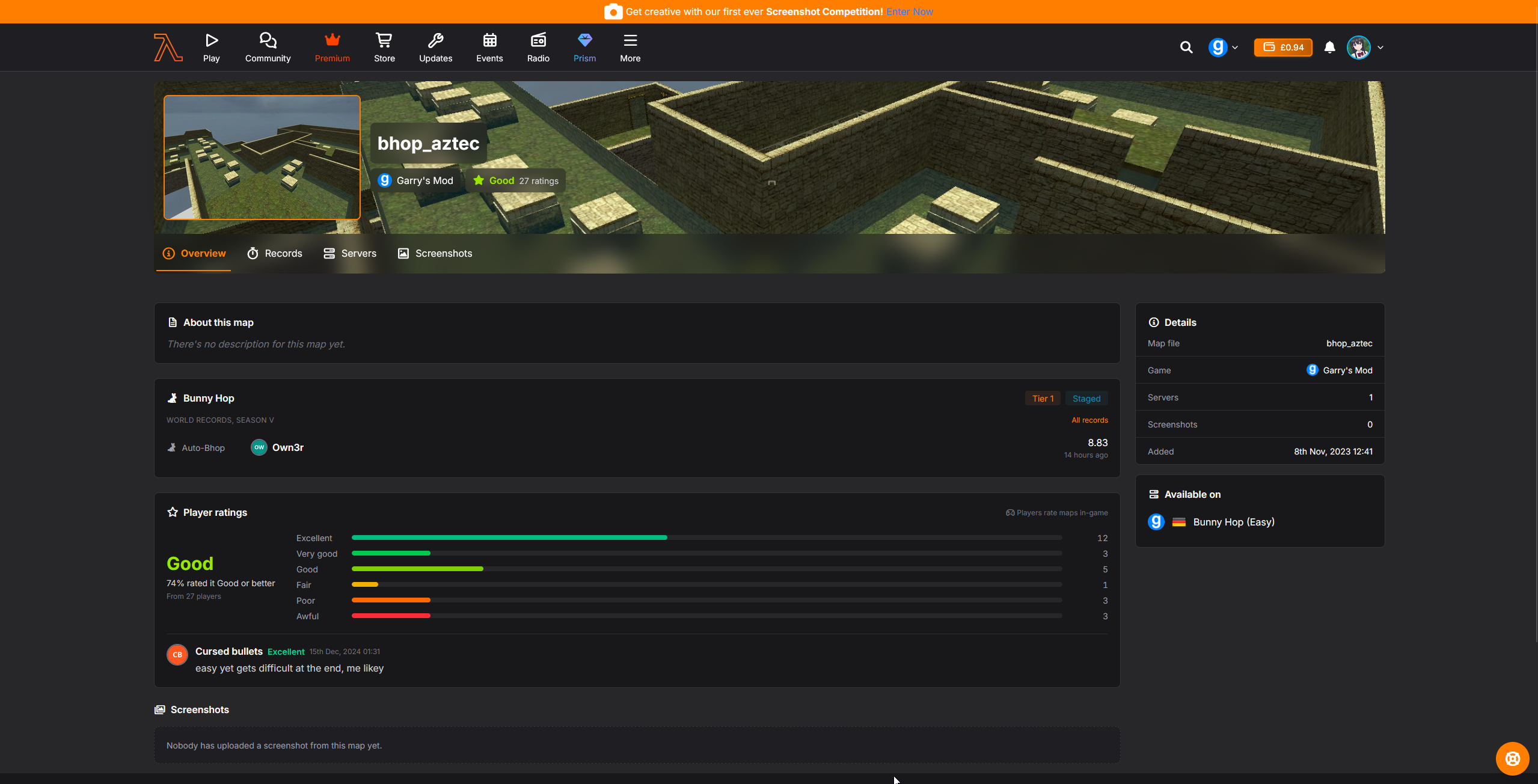
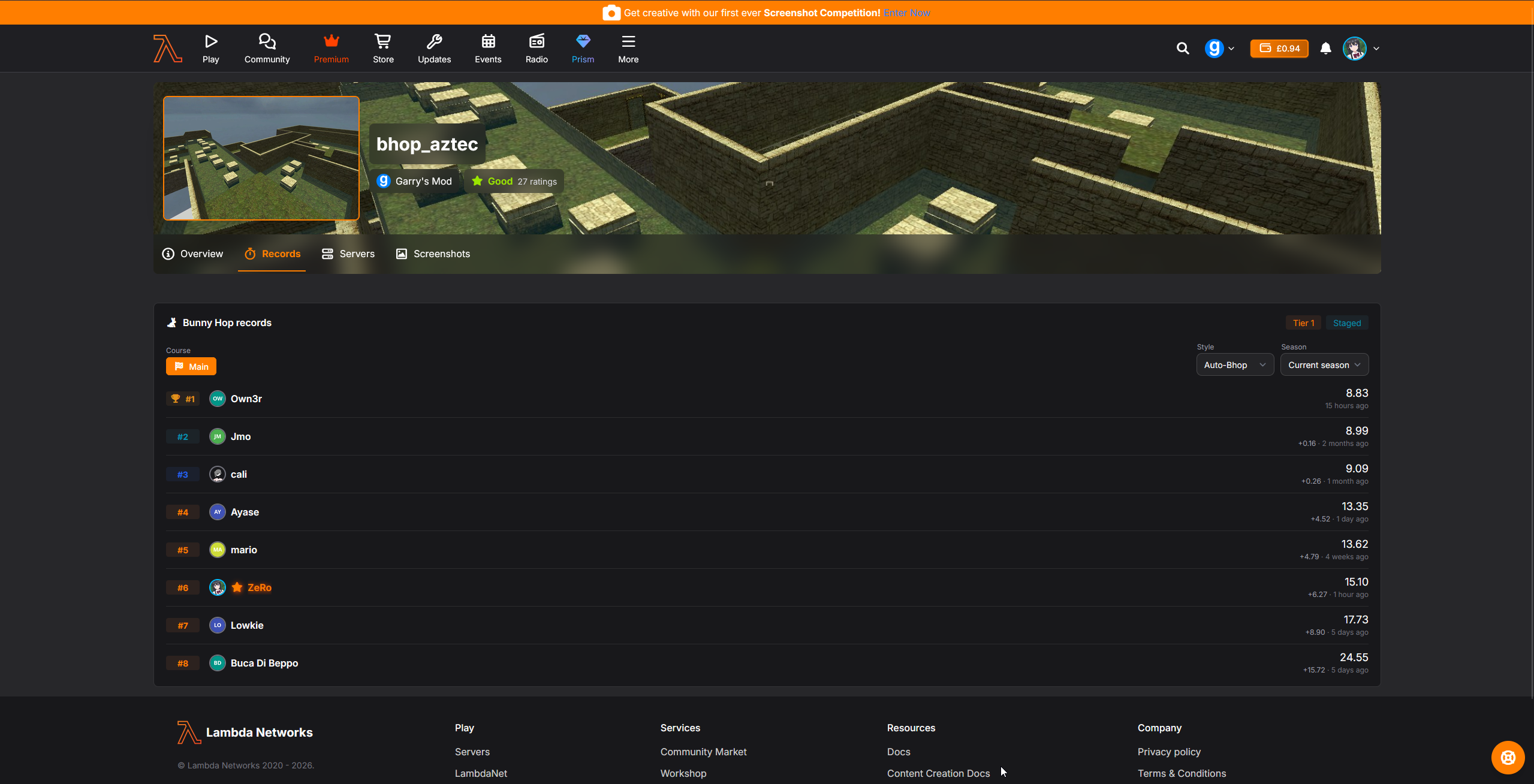
Map pages have received some love too, now featuring Timer records and for the first time, map ratings as submitted by players in-game.
πŸ–ŠοΈ QoL #1 Change Logs

Change logs for the fist QoL update released 07/11/2026

Garry's Mod icon
Garry's Mod
Improvement
Moved fonts which are regularly updated (e.g Glyph fonts) in to variables so it can easily be changed between versions
New Feature
You will now be alerted if you are running an old version of Prism.

The current supported version is 1.4.1

Added
Added Logo and Icon for KZ
Added
Updated Glyph Icons font
Improvement
Refactored Screenshot System

The way screenshots are taken and uploaded have changed. The system has been made more secure from metadata tampering, and in addition, you can now submit your screenshots against live screenshot competitions available on the website.

The Screenshot system now also includes tagging, any other player in your screenshot is tagged against your uploaded screenshot and will be notified, plus this will be shown on their profile under "Tagged Screenshots".

If you do not want to be tagged in screenshots, you can turn this off by going to !options and then Privacy => Uncheck "Allow Screenshot Tags" or type lambda_screenshot_tags 0 in console.

While you will still appear in screenshots, you will not be tagged against them.

Fixed
Fixed Models displayed in the UI clipping

Prism 1.4.1 introduces SetModelNearZ

Counter-Strike Gamemode
New Feature
You can now go up to bots carrying the C4 and press USE to take the C4 from them

You have to be within 140 units of the bot to take the C4.

Improvement
The overhead names now show which player has the C4
Fixed
Fixed the player holding the C4 showing up incorrectly on the Prism radar.
New Feature
Added a hook to disable map factions

Some derrived gamemodes do not use factions

New Feature
Added a hook to disable agents

Some gamemodes have their own player models, lore etc and agents override these.

Zombie Survival
Improvement
The Sentry turret now has a Kill Icon
Improvement
The Raygun now has a Kill Icon
Timer Engine
Improvement
Updated API requests to match the new route URI as part of adding multi-game support for Timer Engine.
Prop Hunt
Fixed
Disable Map Factions
Fixed
Disable Agents
Deathrun
Fixed
Disable Map Factions
Fixed
Disable Agents
Website
Improvement
πŸ—ΊοΈ Map Pages
  • Redesigned the map overview page. It now shows the description, map details (game, map file, date added, map sticker), the servers running the map, recent screenshots, player ratings and recent rating comments
  • Map ratings from in-game are now shown on the site, with the average rating, the percentage of positive ratings and a breakdown of every rating
  • Added a "Play on LambdaNet" section listing the LambdaNet modes the map can be played in
  • Added a Timer Engine section to the overview with the map's tier and this season's fastest time per style
  • Added a new Records tab with the map's Timer Engine leaderboards, filterable by mode, course (main or bonus), category (KZ Pro or TP), style and season. Old shared links still open a board
  • Map links shared on Discord and other sites now show the map image, game, rating and description
  • Map screenshots are now listed newest first
Improvement
πŸ–₯️ Server Pages
  • Redesigned the server page header. It shows the artwork of the map being played, online status, player count, game mode, your ping and whether the server is in your favourites
  • Renamed "Information" to "Overview" and redesigned it. A "Now playing" card shows the current map, its rating and its world record on Timer Engine servers, next to the player list and a sidebar with connect details, region, platform, VAC and Lambda Anti-Cheat status, version and radio listeners
  • The map list can now be searched by console name or friendly name, in both the grid and table layouts
  • The map currently being played is marked "Now playing" in the map list
  • Fixed country and region flags not loading for some servers
  • Fixed link previews failing for servers playing an unknown map
  • Fixed server pages sometimes showing an outdated status after the server reported new stats
Improvement
🎯 Operations
  • Renamed the operation listings to "Current & Upcoming" and "Past Operations"
  • Live operations are now highlighted at the top, with upcoming operations listed soonest first and past operations by end date
  • Redesigned the operation tiles to show mission and player counts
  • Redesigned the operation overview with stats (missions, players, passes activated, missions completed), your own progress and current mission, a preview of the levels and the top 5 players
  • Redesigned the leaderboards to match the in-game layout, with a podium for the top three and your own rank. Players without a site account show under their in-game name
  • Redesigned the missions page with a category list showing how many missions each category has. Categories can be linked to directly
  • Missions now show your own progress and a coloured difficulty label
  • The levels page now shows your current level, your progress and the operation pin
  • The buy points page now uses the operation's own reward name instead of always saying "stars"
Improvement
⏱️ Timer Engine
  • KZ is now public and shows on player profiles and the map Records tab, with a new KZ icon and artwork
  • Timer gametypes are now shared across games. The CS: Source Surf and Bunny Hop gametypes have been merged into the main Surf and Bunny Hop gametypes
  • Timer stats on player profiles can be filtered by game. When a player has records in more than one game, each record shows a game badge
  • Rank and XP are now tracked separately for each game
  • Fixed challenge history sometimes including challenges from other gametypes
  • New challenges are now checked to make sure the map belongs to the game
Improvement
πŸ› οΈ Timer Engine Panel (staff)
  • Added a game switcher to the gametype menu. Every page now works on the selected game's maps, times, zoning servers and map settings
  • Added a new dashboard with live, pending and needs-attention map counts, the latest personal bests, a zoning to-do list with a quick "Set tier" action, and a preprod vs production comparison
  • Each game now has its own map upload category, set in the admin panel under the game's new Timer Engine tab. Pending maps can only be moved into the transfer categories allowed for that game
  • The Transfer Zones warnings now make it clear that a transfer copies every game and gametype, not just the one you are working on
  • Map Settings searches are kept in the URL, so the dashboard can link straight to a single map
  • The admin games list has a new Timer Engine column and filter
Improvement
πŸ“» Radio
  • EPs can now be suggested as a whole release, alongside albums and compilations
  • Hovering over the name or avatar of the staff member who handled a suggestion now opens their profile card
Improvement
πŸ“· Screenshot Updates
  • Redesigned the screenshot profile pages
  • Redesigned the screenshot component
  • Changed the API for uploading screenshots
  • Added a new Screenshot Competition type where screenshots can be posted directly to competitions.
  • Added "Prism UI" component for use in the issue system
  • Screenshots can now tag other players who are featured in the screenshot. Notifications can be turned off via account settings. Players can also opt out from being tagged in screenshots via in-game options
Improvement
πŸ”§ Other Changes
  • Hovering over avatars and names on the developer team pages and on screenshot tiles now opens profile cards
  • Fixed profile hover cards opening far away from the name in wide layouts
  • Added the KZ subgame and fixed the Multi 1v1 subgame icon
πŸ“ QoL #2 Change Logs

Change Logs for QoL #2 released 10/11/2026

Website
Improvement
πŸ“š Help Centre Overhaul
  • The docs have a fresh new look, with a table of contents on every page
  • Let us know if a page helped you with the new feedback buttons at the bottom of each page
  • Added lots of new guides covering getting started, community features, the economy, Premium, support and staff applications, plus new pages for Prism UI, Daily Missions, Ranks & Levels, Surf, Bhop & KZ, LambdaNet and Operations
  • User Guides are now open to everyone, no Lambda Labs required
  • Guide authors can now arrange their sections in any order
New Feature
πŸ”§ Game Utilities 2.0

Added Game Utilities page at https://lambda.tf/game-utilities which contains the new v2.0 Game Utilities, built using Prism UI Desktop

Added
🏠 New Homepage

Try our redesigned homepage in Lambda Labs, with what's on, the latest news, live servers, the radio and the forums all in one place

Improvement
⏱️ Timer Engine Management Panel
  • Zoners can now copy zones from one map to another, even between games, so maps shared by Garry's Mod and CS:S only need zoning once
  • Counter-Strike: Source maps can now get screenshots, uploaded by zoners from the Timer Engine panel
Fixed
Steam group rewards are more reliable: if Steam can't be reached, it no longer counts as you having left the group
Fixed
Radio episodes are now numbered correctly when moved between shows
Improvement
Daily mission difficulties now match the names used in game
Fixed
Fixed staff applications not counting your hours played
Fixed
Fixed Trade History not showing trades you received
Fixed
Fixed meetup votes not adding up correctly
Fixed
Fixed cancelling Lambda Lite also removing Premium
Added
Added Map screenshots for all base CSS Maps
Added
Added CS2 Map screenshots

Covers new maps:

  • ar_shoots_night
  • cs_shelter
  • de_ancient_night
  • de_boulder
  • de_cache
  • de_debris
  • de_eldorado
  • de_fachwerk
  • de_poseidon
  • rush_001
Garry's Mod icon
Garry's Mod
Added
🎁 Steam Group Reward
  • Added a new reward for joining our Steam group: the Steam Group Pin, 50,000 LC, 100 XP and a Covert skin of your choice
  • The reward can be claimed once per Steam account, across every server
  • Added a Steam group prompt after joining, which walks you through joining, confirming and claiming, with help if your Steam profile is private
  • Added !steam, !steamgroup, !group and !joingroup to open the Steam group prompt
  • The Steam card in the Prism pause menu now opens the prompt while your reward is unclaimed
  • If you disconnect while claiming, you'll get your reward the next time you join
  • Fixed the Steam Group Pin being removed from members when Steam couldn't confirm their membership
Improvement
πŸͺŸ Popups
  • Popups shown after joining now open one at a time instead of on top of each other
  • Popups no longer open over the pause menu
  • Popups you dismiss while they're waiting no longer show
  • Removed the Chromium prompt, as Chromium is now part of the main Garry's Mod branch
Improvement
🧩 Missing CS:GO Content
  • Added a prompt for players missing CS:GO content on maps that use it, linking to our guide on installing it
  • It shows once per game session when you're missing 10 or more of the map's CS:GO models and textures, with a "Don't remind me again" option
Improvement
πŸ“£ Socials
  • Added Follow us on X and Follow us on Instagram to the pause menu, above Steam and Discord
  • Added chat adverts for our X and Instagram
  • Got a great clip? Post it in the Clips channel on our Discord and it could be featured on our Instagram
  • Fixed a rare error in the chat advert rotation
  • Added the "fab" chat formatting option for brand icons, such as Discord, Steam and X
LambdaNet Matchmaking
Removed
Removed "Lambda" HL2 Co-op gamemode
Added
Added the new CS Base HL2 Co-op

Now features a difficulty selector and the ability to toggle CS weapons.

Comments
No Comments Yet
Why not post a comment to get the discussion going?