👻 Psst Use code SPOOKY2026 at checkout for 30% off on the Lambda Store up until
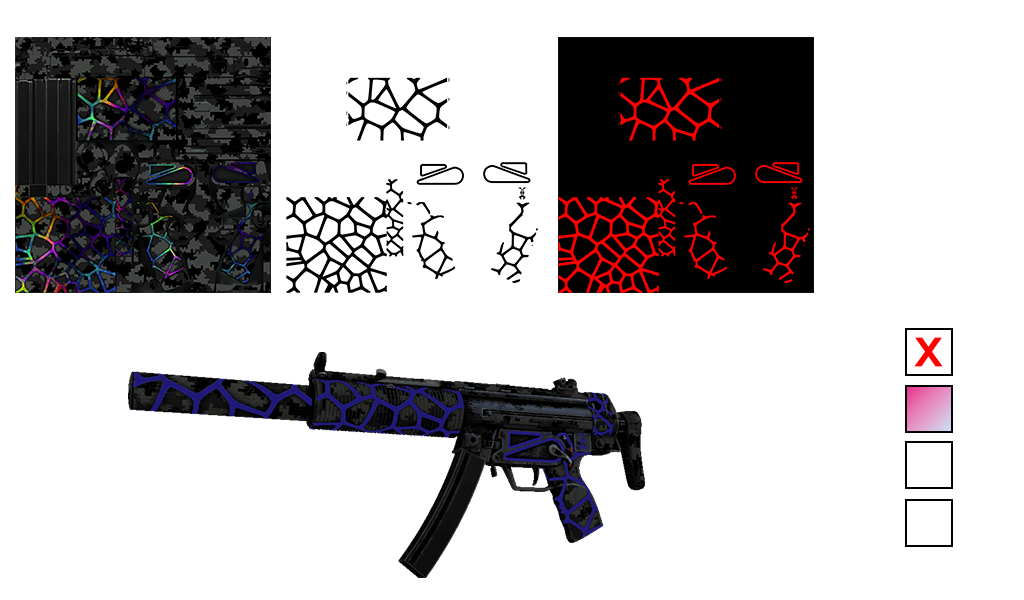
This combines Custom Paint Style with the ability to add animations.
Specify up to three areas within your finish to receive colour animation.
Colour #0 is not used in this style and never needs to be defined.
By using the red, green and blue channels to create a mask, you can have up to three areas within your finish that can show different colours.
In the example below, we are using the MP5-SD | Symbiote. The animation mask only has areas in red, so this finish has one animated area; the other two channels are ignored.
You can add additional areas in the green and blue channels.
The alpha channel, as with Custom Paint Style, defines masking and wear durability. Since the majority of the alpha channel is white, this wears using default wear behaviour, while the animated areas are pure black, so even on a 1.0 Battle-Scarred finish, the animated areas are always visible.
It is not currently possible to use animated textures due to restrictions within the shaders we're using. You can only animate colours.
The following animations are available:
For all animations with the exception of Pulse, you will need to define end colours.
Here is an example Paint Kit in JSON for the Symbiote "Blue" variant:
{
	"ai_symbiote_mp5": {
		"Style": "PAINT_STYLE_ANIMATED",
		"LegacyModel": true,
		"Pattern": "mp5sd_symbiote",
		"AnimMask": "mp5sd_symbiote_anim_mask",
		"DisplayName": "Symbiote",
		"Description": "It has been painted in a dark camo with different colour glow-in-the-dark paints.",
		"FlavourText": "No longer shall you travel in the dark alone",
		"Color1": [13, 0, 153],
		"AnimationType": "ANIMATION_RGBSINE",
		"AnimationData": {
			"EndColor1": [77, 51, 242],
			"SineTime": [0.38, 0.12, 0],
			"SinePeriod": [0.6, 0.8, 1.2]
		}
	}
}
Our starting colour is Color(13, 0, 153), the Color1 setting. Under AnimationData you can see EndColor1, which specifies the ending colour for the animation.
Some animations have different settings. For this paint kit we're using RGB Sine, so we require an ending colour plus two timing settings.
These timing settings specify the timing for each colour channel. In this case, the time for the red colour value is 0.38, 0.12 for green, and 0 for blue.
The same applies to the sine period; these are just vectors that specify timing for red, green, and blue.


 Counter-Strike: Global Offensive
 Counter-Strike 2
 Left 4 Dead 2