👻 Psst Use code SPOOKY2026 at checkout for 30% off on the Lambda Store up until
Unlike with Weapon Paint Kits, sticker compositing is much simpler.
For most styles you only need to provide a base texture with an alpha channel to provide a wear mask.
Some styles require additional composite inputs; these are detailed on each style's page.
We follow the CS2 method for wear masking.
A colour value of exactly 0 / #000000 (black) defines translucency. You should never use a value of 0 for wear masking, as this will cause that area to be completely transparent.
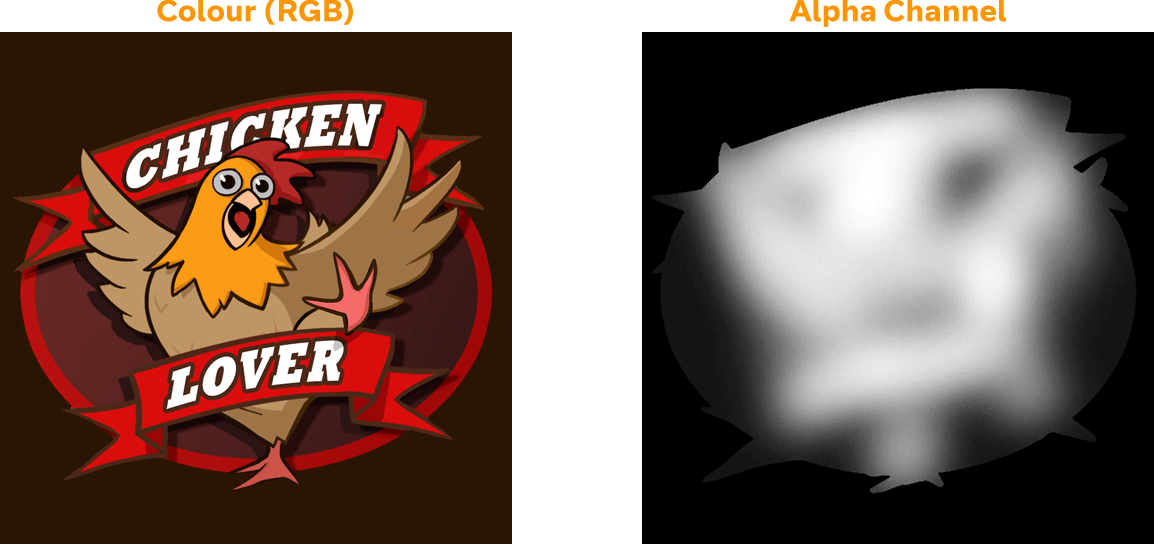
Areas which are pure white (255 / #ffffff) will always remain regardless of wear level, however there are various settings you can set on your Sticker Kit to influence wear.
As you can see in the example above, important areas of the sticker are coloured in white while less important features are darker colours.
| Setting | Description | Default Value | Minimum Value | Maximum Value |
|---|---|---|---|---|
| WearBiasIntensity | Controls how strongly the wear mask (alpha channel) protects areas of the sticker from wear. Higher values mean bright areas of the wear mask resist wear for longer. At 0, the wear mask has no effect and the sticker wears uniformly. At higher values, the contrast between protected and unprotected areas increases; important details like faces, text, and logos survive much longer than background areas. | 1.0 | -4.0 | 4.0 |
| WearBiasColor | For paper-backed styles (Paper, Holographic): Controls how quickly the sticker color wears away to reveal the paper backing underneath. Positive values make the color wear away faster, negative values delay it. At 0, the color wear follows the natural scratch pattern progression. | 0.0 | -4.0 | 4.0 |
| WearScratches | Controls how much the scratches texture affects the sticker. At 1.0, the full scratch pattern is used, with deep scratches and surface wear fully visible. At lower values, the scratch texture is clamped, reducing the intensity of surface damage. At 0, no scratches appear and wear becomes a smooth gradient based only on the wear mask. | 1.0 | 0.0 | 1.0 |


 Counter-Strike: Global Offensive
 Counter-Strike 2
 Left 4 Dead 2